
Vegasino App for UK Players
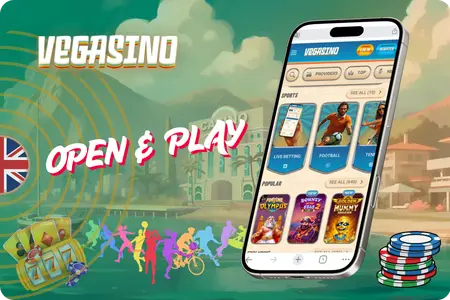
We built our app to run directly in your mobile browser, so there’s no need to download it from an app store. Simply open our website on your phone and log in to access 8,780+ games at your fingertips. Enjoy slots, live dealer games, and sports betting in one place, with no app download required and no additional storage space needed. Add our website to your home screen in seconds for an app-like experience powered by PWA technology. All available bonuses, tournaments, and VIP features remain accessible on your mobile device, so you can enjoy our platform wherever you go.

Alternative Casino Applications
Most casino apps make you download 200+ MB from the store, then hand you half the game library on mobile. We took a different approach. At Vegasino, the full site runs in your browser with zero storage used — live dealer tables included. 8780+ games on any screen. For British players still weighing their options, a few other mobile casinos are listed below.











One thing worth watching is payments. Some mobile casinos quietly disable certain deposit methods on their phone version. We keep all 18 options active across every device — the same £10 minimum, the same 0% fees, the same crypto support. Same on every device. Open the site on your phone and check for yourself. Here is why we built it this way.
Why Use the Vegasino Apk
Most online gamblers now prefer playing on their mobile phones. That is why the Vegasino Casino App is a progressive web app, not a store App download. No stripped-down mobile version, no missing games. It is the full site. Every game, every market, every feature you see on a laptop loads exactly the same when you open it on your phone.
- 8780+ games from 100+ providers : slots, table games, and live dealer rooms all load on mobile.
- Sportsbook with 30+ sports and live betting at the same odds you get on desktop
- Every payment method works on phone : cards, e-wallets, and crypto, all with 0% fees from £10.
- Full bonus system on mobile : Challenges, Tournaments, Bonus Crab, Shop, and VIP Levels.
- No storage taken on your device. The site loads fresh from your browser every time
- One account across all screens. Balance, history, and active bonuses sync instantly.
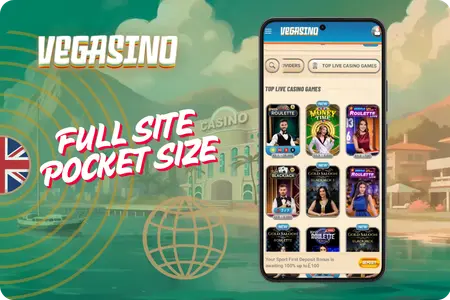
Same account, same balance, same product on any screen. Whether you add a shortcut or just type the URL each time is entirely up to you. Three options, all work.
What Makes the Vegasino App Different?
The App gives players access to the casino and sportsbook directly from a mobile browser, without requiring a traditional
App Store or Google Play download. The progressive web app keeps the main app experience running across supported mobile devices, including games, account features, promotions, and payments.
Instant Mobile Access
Open app directly in your mobile browser and start using your account without waiting for a traditional application download. You can also add a shortcut to your home screen for faster access on future visits.
Casino Games on Mobile
The mobile experience gives you access to the casino lobby from a compatible smartphone or tablet. Slots, table games and live casino content can be opened from the same mobile environment as the main website.
Mobile Sportsbook
Casino also brings sportsbook access to mobile devices, allowing users to browse available sports and betting markets without switching to another platform or creating a separate mobile account.
Payments from Your Phone
Account deposits and withdrawals can be managed from a supported mobile browser using the payment methods available to your app account. The mobile interface keeps banking options within the same account area.
One Casino Account
Your app account remains connected across supported devices. Your balance, account information, game activity and available promotions are managed through the same login rather than through a separate mobile profile.
Home Screen Shortcut
If you use casino regularly, you can add the website to your phone’s home screen. This creates a convenient shortcut so you can launch the mobile experience without entering the website address every time.
Vegasino Casino App Access Options
You can reach the app from your phone in three ways: a home screen shortcut on Android, the same on iOS, or simply typing the URL into any mobile browser. All three open the full site with no difference in what you can do. Most major platforms already work this way. No store listing might raise eyebrows, but the table below shows why a app download is no longer necessary.
| Doubt | Reality |
| No app in the store | Runs in your browser, ready in seconds |
| Fewer games on mobile | All 8780+ titles load on any screen |
| Eats up phone storage | 0 MB, nothing to download |
| Hard to find the site again | Home screen shortcut, one tap |
| Progressive web app | Same SSL, same login protection |
| Bonuses missing on mobile | Every promo, tournament, and VIP level |
| Updates need manual install | Refreshes itself every time you open it |
This approach is just as safe as anything you would get from the App Store or Google Play. We run the same encryption, the same servers, and the same verification on any device. Your account knows no difference. If you have never pinned a shortcut to your home screen before, the two walkthroughs below start with Android.
Android App Install
The Vegasino Apk is set up as a progressive web app, and Chrome on Android can install it directly. When you tap ‘Add to Home screen’ in Chrome, the system offers to install the site as a standalone app on your device. Same result, no store involved. The six steps below take about 15 seconds.
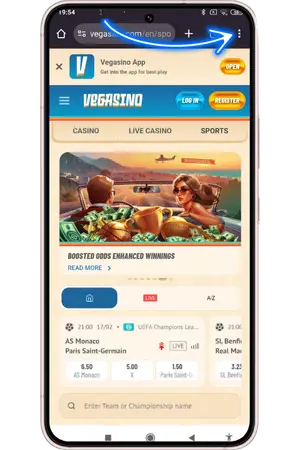
- Tap the three-dot menu
Tap the icon ( ⋮ ) in the top right corner of Chrome to open the browser menu.
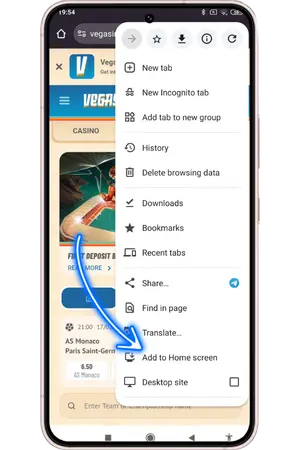
- Tap Add to Home screen
Find ‘Add to Home screen’ in the dropdown list and tap it.
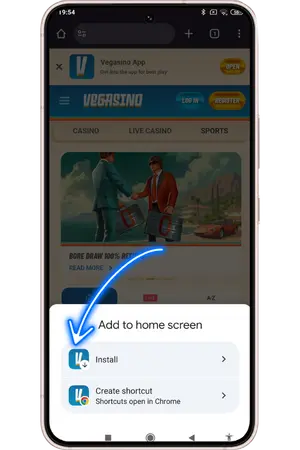
- Choose Install over shortcut
Chrome gives you two options : ‘Install’ and ‘Create shortcut’. Tap ‘Install’. This registers the site as a full app on your device rather than a simple bookmark.
- Confirm the installation
A final prompt shows the Vegasino icon and site address. Tap ‘Install’ in the bottom right corner.
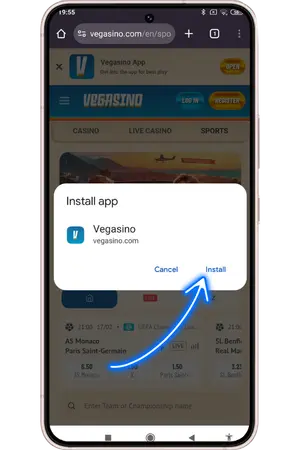
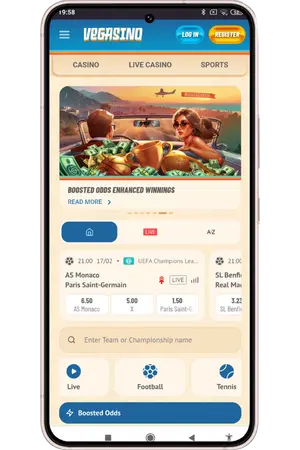
- The app opens full-screen
The site launches without an address bar or browser tabs. Everything loads exactly as it would on desktop.
- Find it on your home screen
The Vegasino icon now sits on your home screen alongside your other apps. One tap to open.
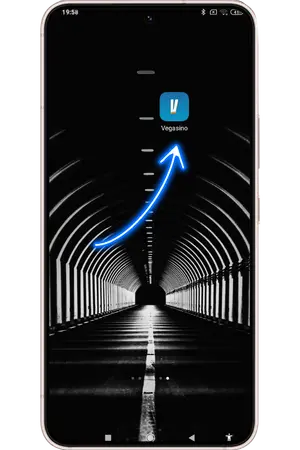
Six taps and it is done. Because you chose Install, Android treats the site as a standalone app. It appears in your app drawer, you can manage it from settings, and the system even labels it ‘installed from Google Play Store’. Under 1 MB, nothing else to manage. iPhone and iPad work differently, but the result is identical.
iOS App Install
The site works natively with Safari, so adding the Vegasino Casino App to your iPhone or iPad takes five taps. The icon opens full-screen with a clean interface, just like a store app.
- Tap the Share icon in Safari. Open casino in Safari and tap the Share button (square with an arrow pointing up). Depending on your settings, it may appear at the top or bottom of the screen.
- Find Add to Home Screen. In the Share menu, look for ‘Add to Home Screen’. If you do not see it straight away, tap ‘More’ at the bottom of the list to reveal the full set of options.
- Tap Add to Home Screen Select ‘Add to Home Screen’ from the expanded list. This tells your iPhone to save the site as a standalone web app.
- Confirm and tap Add. A preview screen shows the icon and lets you edit the name. Make sure ‘Open as Web App’ is switched on, then tap ‘Add’ in the top right corner.
- Launch from your home screen. The icon now sits on your home screen. Tap it and the site opens full-screen with no Safari interface. Your balance, games, and account are all right there.
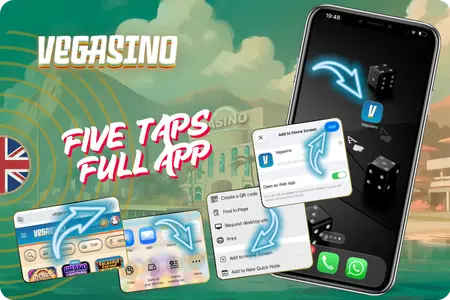
Safari handles everything behind the scenes: zero storage, automatic updates, and your device treats it like a real app. If you would rather skip shortcuts altogether, there is a third option that needs no setup at all.
Vegasino App at a Glance
The mobile experience is designed to keep the main casino platform reachable from smartphones and tablets. Instead of
maintaining a separate mobile account, players use the same casino login to access the casino, sportsbook, payments, and account functions from a compatible browser.
Play in Browser No Install
Adding a shortcut works well on both Android and iOS, and we stand behind that approach. The Vegasino Application also runs directly in any mobile browser, with full access to your profile and features. The shortcut gives you a few extras worth a quick look.
- Faster repeat loading. The shortcut caches files locally so pages open quicker after the first visit
- Stronger on weak signal. Cached data keeps the site steady when your connection drops.
- Full-screen mode. Address bar and tabs disappear, giving your games more room.
- One tap to launch from your home screen instead of typing the URL each time.
- Silent background updates. The site refreshes itself with no manual action from you.
- All browsers supported without a shortcut : Chrome, Safari, Firefox, Samsung Internet, Opera.
Play daily? The shortcut saves time and bandwidth. Drop in once a month? The browser is plenty. Same account either way. What matters next is keeping that account safe on any device.
Vegasino Mobile Security & Responsible Gaming
Using app from a smartphone does not require a separate mobile account. Players access the same account through a compatible browser, while verification, account security, and responsible gaming settings all remain reachable from mobile. You can manage both gameplay and account controls without switching to a desktop device.
Account Verification
Verification may be required for certain account actions, transactions or withdrawals. Keeping your account information accurate can help avoid unnecessary delays when additional verification is requested.
Encrypted Connection
The casino website is accessed through an encrypted connection, including when you use the service from a smartphone or tablet. Always check that you are visiting the correct website before entering account information.
Spending Controls
Responsible gaming settings can be managed from your account. Depending on the available tools, players can use limits and session controls to keep their gambling activity within a level they are comfortable with.
Self-Exclusion
Players who want to stop gambling can use the responsible gaming options available through their account or contact customer support for assistance with self-exclusion.
Security Updates and Device Requirements
Player safety is how we operate, not an afterthought. The Vegasino App encrypts every page and every transaction the same way, whether you are on a phone or a laptop. One standard, no exceptions.
| What | Details |
| Android | 5.0 or higher |
| iOS | 15.0+ with Safari |
| Browsers | All major mobile browsers |
| Connection | 3G, 4G, 5G, or Wi-Fi |
| Storage | Under 1 MB, with shortcut - 0 MB without |
| Encryption | Every page and payment, any device |
| First payout | ID, proof of address, payment screenshot |
| Spending controls | Deposit caps, loss limits, session reminders |
| Self-exclusion | Any time via settings or Live Chat |
| Support | Live Chat + [email protected], 24/7 |
| Official sources | uk-vegasino.com and our Telegram channe |
We built all of this so you would not have to think about it. The encryption runs, the site updates, and your account stays protected without any extra steps on your part. Security works by default. If anything is still unclear, the answers below cover the most common questions.
Frequently Asked Questions
Yes. Android 5.0 or higher, iOS 15.0 or higher. No flagship needed. If your browser is current and you have a stable connection, the full library of casino games and live casino tables loads the same way it does on a new phone.
Your account security is identical on every device. We encrypt every page and every transaction with the same SSL protocol on phones, tablets, and desktops. Adding a shortcut to your home screen does not change that. Use a strong unique password for extra protection.
You can. Every responsible gaming tool works on mobile : deposit caps, loss limits, session reminders, and full self-exclusion. Open your profile, go to the Responsible Gaming section, or reach Live Chat any time.
We recommend Install. It registers the casino app as a standalone application on your phone, shows it in your app drawer, and Android labels it as installed from Google Play Store. Create shortcut is just a bookmark. Both open the site full-screen, but Install gives you a cleaner setup.
No. The site pulls the latest version every time you open it. No update prompts, no store downloads, no version numbers. Keep your browser and OS current and we handle the rest.
It is not. We do not have a PWAin Google Play or the App Store. The only official way to install the Vegasino App is from our website. If you see a similar name in any store, it is not connected to us. Reach out via Live Chat when in doubt.